Print queues in the Polar Cloud
10.5 Print queues in the Polar Cloud
The Polar Cloud maintains a print queue for each printer, allowingmultiple members (those Polar Cloud members authorized to usethat printer; see Section 9.2.3) to submit print jobs to a printer.
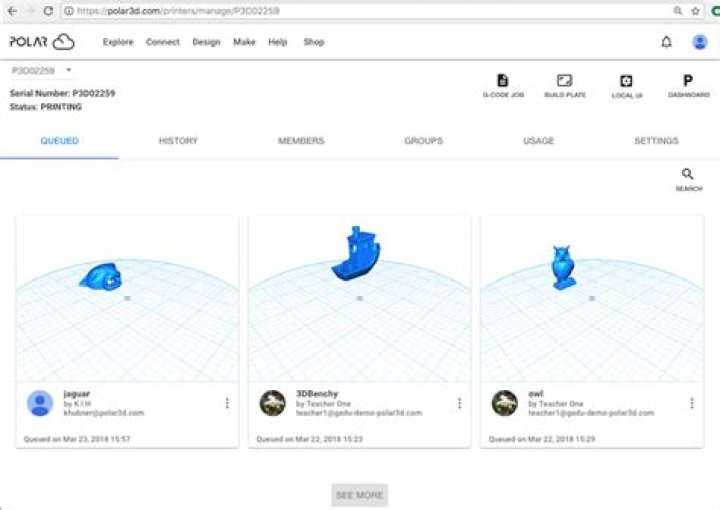
Figure 10.37: Polar Cloud printer management QUEUED display
From the printer management screen, clicking on“QUEUED” will show a display of jobs on the print queue; see Figure10.37. The printer dashboard screen also shows a display of jobs onthe printer queue; see Figure 10.38. Note that Figure 10.37 andFigure 10.38 are both examples of what the owner or a manager of aprinter, or any member of a group configured to have printer controlof any shared printers, will see: namely all jobs in the print queue,including jobs submitted to the printer by other Polar Cloudmembers. But a Polar Cloud member who is allowed to use theprinter but who is neither the owner nor a manager, (nor a memberof a group configured to have control of shared printers), willonly see his or her own jobs; see Figure 10.42 and Figure10.43.
Figure 10.38: Printer dashboard: printer manager’s view of job queue
The printer owner and any other printer managers (or anygroup members with control access to a shared printer) can use thecontrol buttons on the printer dashboard, such as the “START”button which initiates the actual execution of the first print job inthe printer’s queue. Once a job is printing, control buttons appearto “CHANGE FILAMENT”, “COLD PAUSE”, “PAUSE”, or “STOP”the print job; these control buttons are active for the ownerand managers (and group members with control access). Incontrast, these job execution control buttons are not active forgeneral (non-manager) users of the printer: when a non-manageruser views the printer dashboard, the control buttons are allgrayed-out, and in particular a non-manager user can neitherinitiate nor interrupt the printer’s current job. See Section10.4.2 for further discussion of the printer dashboard controlbuttons.
The printer owner and managers may not only view all jobsin a printer’s queue, including jobs of other members, suchmanagers may also modify any job in the queue, including jobssubmitted by other members. In particular, a printer managermay delete any job from the print queue, or rearrange theorder of all jobs in the queue, or merge any queued jobs. (Group members with “Control Printers” access may view alljobs in the queue, and may rearrange the order of all jobs inthe queue.) A print job owner may modify their own printjobs. See Section 10.5.1 for details on modifying queued printjobs.
Note that the Polar Cloud also maintains a history list of what hasbeen printed on the printer – thus the print queue’s entire history ofjobs.From any of a printer’s “MANAGE” screens, such as the “QUEUED”screen shown inFigure 10.37 or Figure 10.42, clicking onthe “HISTORY” tab will show the history of what has been printedon the printer; see Figure 9.28.