put_bucket_replication - Boto3 1.34.75 documentation
Note
This operation is not supported by directory buckets.
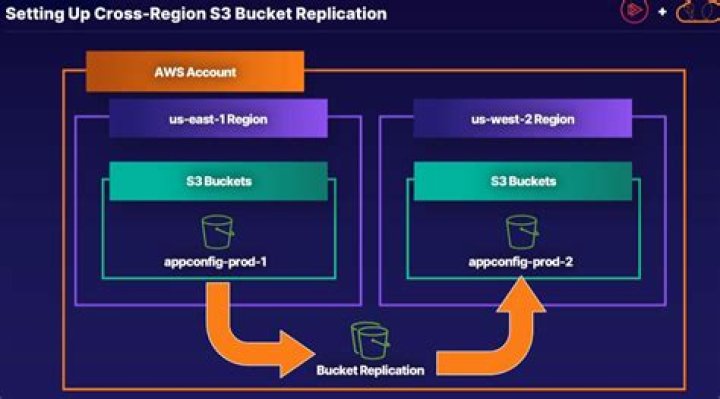
Creates a replication configuration or replaces an existing one. For more information, see Replication in the Amazon S3 User Guide.
Specify the replication configuration in the request body. In the replication configuration, you provide the name of the destination bucket or buckets where you want Amazon S3 to replicate objects, the IAM role that Amazon S3 can assume to replicate objects on your behalf, and other relevant information. You can invoke this request for a specific Amazon Web Services Region by using the aws:RequestedRegion condition key.
A replication configuration must include at least one rule, and can contain a maximum of 1,000. Each rule identifies a subset of objects to replicate by filtering the objects in the source bucket. To choose additional subsets of objects to replicate, add a rule for each subset.
To specify a subset of the objects in the source bucket to apply a replication rule to, add the Filter element as a child of the Rule element. You can filter objects based on an object key prefix, one or more object tags, or both. When you add the Filter element in the configuration, you must also add the following elements: DeleteMarkerReplication, Status, and Priority.
Note
If you are using an earlier version of the replication configuration, Amazon S3 handles replication of delete markers differently. For more information, see Backward Compatibility.
For information about enabling versioning on a bucket, see Using Versioning.
Handling Replication of Encrypted Objects
By default, Amazon S3 doesn’t replicate objects that are stored at rest using server-side encryption with KMS keys. To replicate Amazon Web Services KMS-encrypted objects, add the following: SourceSelectionCriteria, SseKmsEncryptedObjects, Status, EncryptionConfiguration, and ReplicaKmsKeyID. For information about replication configuration, see Replicating Objects Created with SSE Using KMS keys.
For information on PutBucketReplication errors, see List of replication-related error codes
Permissions
To create a PutBucketReplication request, you must have s3:PutReplicationConfiguration permissions for the bucket.
By default, a resource owner, in this case the Amazon Web Services account that created the bucket, can perform this operation. The resource owner can also grant others permissions to perform the operation. For more information about permissions, see Specifying Permissions in a Policy and Managing Access Permissions to Your Amazon S3 Resources.
Note
To perform this operation, the user or role performing the action must have the iam:PassRole permission.
The following operations are related to PutBucketReplication:
See also: AWS API Documentation
Request Syntax
response = client.put_bucket_replication( Bucket='string', ChecksumAlgorithm='CRC32'|'CRC32C'|'SHA1'|'SHA256', ReplicationConfiguration={ 'Role': 'string', 'Rules': [ { 'ID': 'string', 'Priority': 123, 'Prefix': 'string', 'Filter': { 'Prefix': 'string', 'Tag': { 'Key': 'string', 'Value': 'string' }, 'And': { 'Prefix': 'string', 'Tags': [ { 'Key': 'string', 'Value': 'string' }, ] } }, 'Status': 'Enabled'|'Disabled', 'SourceSelectionCriteria': { 'SseKmsEncryptedObjects': { 'Status': 'Enabled'|'Disabled' }, 'ReplicaModifications': { 'Status': 'Enabled'|'Disabled' } }, 'ExistingObjectReplication': { 'Status': 'Enabled'|'Disabled' }, 'Destination': { 'Bucket': 'string', 'Account': 'string', 'StorageClass': 'STANDARD'|'REDUCED_REDUNDANCY'|'STANDARD_IA'|'ONEZONE_IA'|'INTELLIGENT_TIERING'|'GLACIER'|'DEEP_ARCHIVE'|'OUTPOSTS'|'GLACIER_IR'|'SNOW'|'EXPRESS_ONEZONE', 'AccessControlTranslation': { 'Owner': 'Destination' }, 'EncryptionConfiguration': { 'ReplicaKmsKeyID': 'string' }, 'ReplicationTime': { 'Status': 'Enabled'|'Disabled', 'Time': { 'Minutes': 123 } }, 'Metrics': { 'Status': 'Enabled'|'Disabled', 'EventThreshold': { 'Minutes': 123 } } }, 'DeleteMarkerReplication': { 'Status': 'Enabled'|'Disabled' } }, ] }, Token='string', ExpectedBucketOwner='string')
- Parameters:
Bucket (string) –
[REQUIRED]
The name of the bucket
ChecksumAlgorithm (string) –
Indicates the algorithm used to create the checksum for the object when you use the SDK. This header will not provide any additional functionality if you don’t use the SDK. When you send this header, there must be a corresponding
x-amz-checksumorx-amz-trailerheader sent. Otherwise, Amazon S3 fails the request with the HTTP status code400 Bad Request. For more information, see Checking object integrity in the Amazon S3 User Guide.If you provide an individual checksum, Amazon S3 ignores any provided
ChecksumAlgorithmparameter.ReplicationConfiguration (dict) –
[REQUIRED]
A container for replication rules. You can add up to 1,000 rules. The maximum size of a replication configuration is 2 MB.
Role (string) – [REQUIRED]
The Amazon Resource Name (ARN) of the Identity and Access Management (IAM) role that Amazon S3 assumes when replicating objects. For more information, see How to Set Up Replication in the Amazon S3 User Guide.
Rules (list) – [REQUIRED]
A container for one or more replication rules. A replication configuration must have at least one rule and can contain a maximum of 1,000 rules.
Token (string) – A token to allow Object Lock to be enabled for an existing bucket.
ExpectedBucketOwner (string) – The account ID of the expected bucket owner. If the account ID that you provide does not match the actual owner of the bucket, the request fails with the HTTP status code
403 Forbidden(access denied).
- Returns:
None
Examples
The following example sets replication configuration on a bucket.
response = client.put_bucket_replication( Bucket='examplebucket', ReplicationConfiguration={ 'Role': 'arn:aws:iam::123456789012:role/examplerole', 'Rules': [ { 'Destination': { 'Bucket': 'arn:aws:s3:::destinationbucket', 'StorageClass': 'STANDARD', }, 'Prefix': '', 'Status': 'Enabled', }, ], },)print(response)
Expected Output:
{ 'ResponseMetadata': { '...': '...', },}