Tinkercad objects saved to the Polar Cloud
6.3.2 Tinkercad objects saved to the Polar Cloud
Whether Tinkercad is invoked from the Polar Cloud or run separately, youmay use Tinkercad’s object “Download” feature, as normal, to download an.stl filefor one of your objects or an object shared by another, and thensubsequently upload that downloaded Tinkercad object .stl fileinto the Polar Cloud.
Alternatively, Tinkercad supports exporting your own objectsdirectly to the Polar Cloud. A video demonstration may be viewedat Polar 3D’s YouTube channel Sending Objects from Tinkercad tothe Polar Cloud.
In the Tinkercad tinkeringwindowclick “Export”, see Figure 6.51, to bring up a screen at which youmay select “3D Print”, which provides the option of using aconvenient “POLAR CLOUD” button, see Figure 6.52.
Figure 6.51: Tinkercad tinkering screen Export button
Figure 6.52: Tinkercad Export, 3D Print, POLAR CLOUD button
After clicking Tinkercad’s “POLAR CLOUD” button, Tinkercad willask to confirm that you wish to “Continue to Polar3D”; see Figure6.53.
Figure 6.53: Tinkercad Continue to Polar3D button
Note that your browser will need to allowpop-upsfrom Tinkercad in order to use this Tinkercad export-to-the-Polar-Cloudfeature. For instance, Figure 6.54 shows enabling such pop-ups inChrome. (See Section 15.3 for further discussion of enabling pop-upsin your browser, to allow Tinkercad to export directly to the PolarCloud.)
Figure 6.54: Chrome: Tinkercad pop-up was blocked; now configuring to allow it
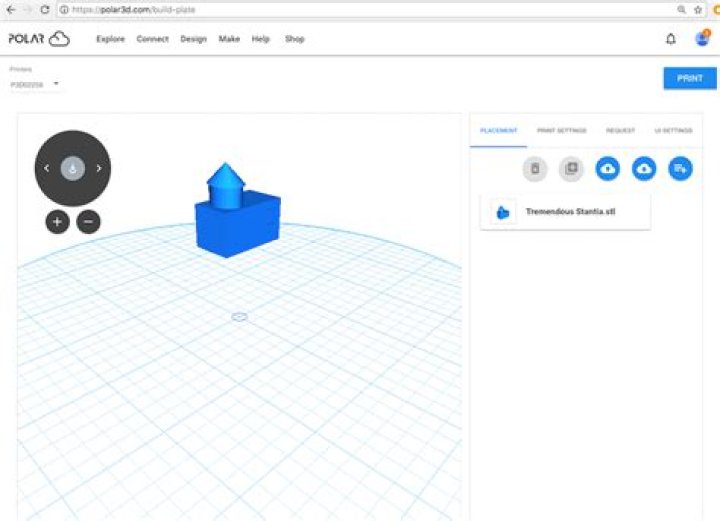
When you export an object from Tinkercad directly to the PolarCloud, the object will be loaded directly onto the Polar Cloud buildplate in a new window; see Figure 6.55.
Figure 6.55: Tinkercad object exported to the Polar Cloud build plate
The object will also automatically be placed in your “MYOBJECTS” collection; see Figure 6.56.
Figure 6.56: MY OBJECTS collection including a Tinkercad object
Note the Tinkercad logo on the object in Figure 6.56; objectsexported from Tinkercad directly to the Polar Cloud will includesuch a logo, which is a live link back to your Tinkercaddashboard!